
Advanced Protection is Google’s ultimate security shield for Android devices, designed to safeguard personal and professional data against hackers, malware, and phishing attacks. While most users rely on standard security settings, Advanced Protection goes far beyond, offering layers of hidden defenses that operate silently in the background.
But why should Android users take this seriously? Let’s explore the 7 powerful reasons to enable Advanced Protection today and how it can completely transform your smartphone security.
1. Locking Critical Security Settings
One of the most effective ways Advanced Protection strengthens Android security is by locking essential system settings:
- Prevents disabling core security features.
- Blocks the installation of apps from untrusted sources.
- Automatically scans installed apps and downloaded files.
According to SlashGear, these measures ensure that even inadvertent clicks on suspicious links or accidental downloads from untrusted sources cannot compromise your device. By locking these critical settings, Advanced Protection creates a baseline security level that hackers find extremely difficult to bypass.
2. Hidden Threat Detection & Automatic Locking
Advanced Protection continuously monitors your device for unusual or suspicious activity. Its proactive measures include:
- Automatically locking the phone when risky behavior is detected.
- Enforcing stronger lock-screen rules.
- Enhancing security for browsing, messaging, and app usage.
These hidden layers ensure that threats are neutralized before they reach sensitive data. For example, if a phishing link is clicked accidentally, the device may prevent the app from launching or warn the user, mitigating potential damage.
3. Safeguarding Sensitive Personal & Financial Data
Smartphones store an enormous amount of sensitive information, from banking apps to work communications. Advanced Protection helps keep this data secure by:
- Preventing unauthorized access to apps and files.
- Warning against suspicious emails, messages, and links.
- Automatically blocking the installation of malicious or unverified apps.
The U.S. Cybersecurity & Infrastructure Security Agency (CISA) reports that smartphones are primary targets for cybercriminals because they contain extensive personal information. Advanced Protection reduces vulnerabilities, ensuring your private data remains private.
4. Integration With Google Account & Security Keys
Activating Advanced Protection requires a direct link to your Google account. The setup includes:
- Visit the official Advanced Protection enrollment page.
- Registering your Google account for protection.
- Pairing with physical security keys (USB or wireless).
YubiKey 5 NFC – Hardware security key compatible with Google accounts for robust authentication.
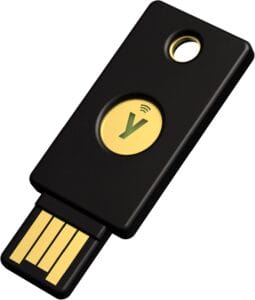

Security keys provide a hardware-based authentication method, adding a second, more secure layer beyond passwords or SMS codes. This dual-layer protection dramatically reduces the chances of account takeovers, especially from sophisticated phishing attacks.
Tip: Using two security keys—one for everyday use and a backup—is recommended for maximum security.
5. Continuous Monitoring & Real-Time Threat Alerts
Once activated, Advanced Protection operates silently, monitoring all connected devices and accounts. Key features include:
- Real-time phishing attempt detection.
- Early identification of unauthorized logins.
- Strengthened login security for sensitive actions.
This means that even if hackers manage to bypass password or multi-factor authentication, they cannot compromise your session without your physical security keys. Advanced Protection ensures complete, ongoing monitoring without interrupting daily usage.
6. Preventing Malware & Phishing Attacks
Advanced Protection protects against the most common smartphone threats:
- Blocks malicious apps from installation.
- Detects phishing emails and texts before interaction.
- Prevents data theft via fake apps or malicious websites.
By preemptively mitigating these attacks, Advanced Protection helps Android users maintain a secure ecosystem, crucial in an era of increasing digital threats.
7. Complementary Security Tools
To further enhance Android security alongside Advanced Protection, consider these trusted products:
Norton 360 Platinum 2025 – Protects against malware, phishing, and spyware.

NordVPN – Encrypts your connection, especially on public Wi-Fi networks.

Affiliate Note: Wiztechno may earn a commission if these products are purchased via the links, at no extra cost to you.
Best Practices for U.S. Android Users

- Enable Advanced Protection immediately and link your security keys.
- Avoid installing apps from unverified sources.
- Regularly monitor account activity for unusual access patterns.
- Use VPN services when connecting to public Wi-Fi networks.
- Educate family members or colleagues on phishing awareness.
By following these steps, users create a comprehensive defense layer that actively reduces the risk of cyber threats.
Real-World Examples
Example 1: A banking professional received a phishing email with a link mimicking a Google login. Advanced Protection intercepted the attempt, blocked the app, and alerted the user, preventing unauthorized access to work accounts.
Example 2: An Android user browsing public Wi-Fi in a café faced a Man-in-the-Middle (MITM) attack. With VPN integration and Advanced Protection enabled, the malicious traffic was blocked before reaching sensitive apps.
Frequently Asked Questions ❓
Q1: Is Advanced Protect compatible with all Android devices?
A1: Any device running Android 7 or higher can utilize Advanced Protection. Full hardware key integration provides maximum security.
Q2: Will Advanced Protect affect device performance?
A2: No, it operates in the background without affecting performance or daily tasks.
Q3: Can Advanced Protect be bypassed?
A3: Bypassing is strongly discouraged. Doing so compromises your security and exposes sensitive data.
Q4: How does it prevent phishing attacks?
A4: Advanced Protect blocks untrusted apps, warns about suspicious links, and ensures hackers cannot hijack your account.
Q5: What happens if my security key is lost?
A5: Google allows registering backup keys to prevent loss of account access while maintaining strong protection.
Conclusion
Activating Advanced Protection on Android is a critical step for securing personal and professional data. From automatic threat detection to hardware-based authentication, it delivers layers of security far beyond typical phone settings.
Take action today: Enable Advanced Protect, integrate a trusted VPN, and consider hardware keys to fortify your digital life. Your data, privacy, and peace of mind are worth it.


I think this web site holds very good pent written content content.
I am really enjoying the theme/design of your web site. Do you ever run into any web browser compatibility problems? A few of my blog audience have complained about my blog not operating correctly in Explorer but looks great in Safari. Do you have any ideas to help fix this problem?